Get A Quote
Jul 03,2026
A high‑speed digital web press running at 180 metres per minute with 1200 DPI resolution operates at the edge of precision engineering. The printheads fire millions of ink droplets per second, the web path guides paper under tension through multiple colour stations, and the cutting unit delivers finished sheets to the stacker. When any one of these subsystems drifts out of specification—a partially clogged nozzle, a misaligned paper guide, a contaminated encoder strip—the result is visible on the printed sheet within seconds. The press does not stop; it continues producing, turning a minor deviation into thousands of wasted impressions before the operator catches the defect.
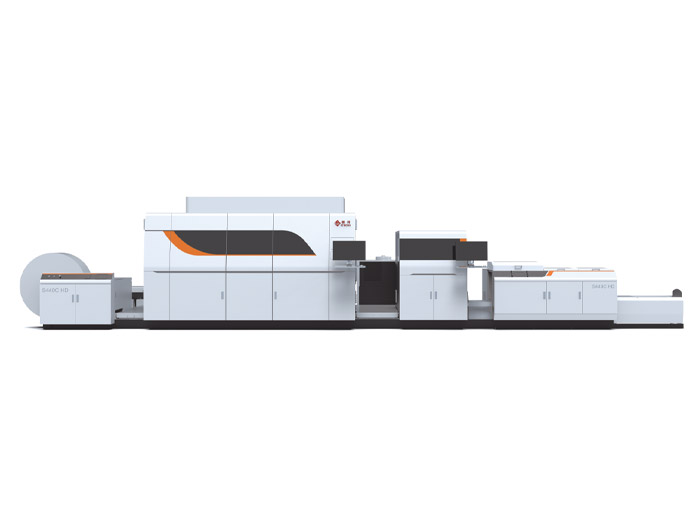
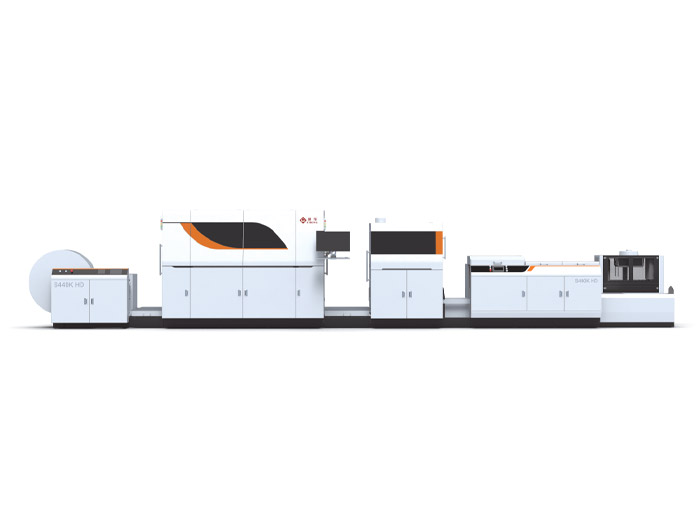
The maintenance programme that prevents these losses is not complex, but it must be followed without exception. The tasks below are structured around the key subsystems of a high‑speed digital press: the print engine, the web transport, the ink supply, and the finishing unit. For operators running an Inkjet Commercial Web Press, establishing a structured maintenance routine from day one helps sustain the 180 m/min production speed and 1200 DPI output quality that the machine is designed to deliver.

1. Print a nozzle check pattern and inspect. At the start of every shift, before the production run begins, print the press manufacturer's nozzle check pattern. Examine it under magnification or with the machine's built‑in camera system for any missing lines or misdirected droplets. A single clogged nozzle in a 1200 DPI printhead may not show on a full‑colour image, but it will appear as a faint white line in solid colour areas. If any nozzles are missing, run the automated head cleaning cycle and re‑print the check. Repeat until all nozzles are firing correctly. If the same nozzles fail repeatedly, the printhead may need a manual wipe or a longer soak cycle with cleaning solution.
2. Clean the web path and paper sensors. Paper dust and ink mist accumulate on the rollers, guide plates, and optical sensors along the web path. Dust on a sensor can cause false paper‑break detection and stop the press mid‑run. Wipe the rollers and guides with a lint‑free cloth and a mild roller cleaner, and clean the sensor lenses with isopropyl alcohol and a cotton swab. Pay particular attention to the tension control zones, where dust build‑up can cause slippage and registration errors between colours.
3. Check the ink levels and the ink supply filters. The ink reservoirs for each colour should be checked at the start and end of every shift. Running a printhead dry, even momentarily, can draw air into the ink channels and require an extended purge cycle to restore proper jetting. The in‑line filters in the ink supply hoses should be visually inspected; a filter that appears dark or has visible sediment should be replaced. Consistent ink supply is critical—a momentary pressure drop can cause banding across the entire web width.
4. Empty the waste ink container. Digital web presses generate waste ink from printhead purges, cleaning cycles, and the occasional overspray. The waste container has a level sensor, but the sensor can fail. Checking the container level manually at the start of each shift prevents an overflow that would shut down the press and potentially damage the electronics.
5. Inspect the first ten printed sheets of each run. Before releasing a job to full production, pull and inspect at least ten consecutive sheets under standard viewing light. Look for colour consistency across the sheet width, front‑to‑back registration on double‑sided prints, and any repeating defects that would indicate a damaged roller, a dirty encoder, or a failing printhead. This visual check catches problems that a nozzle test alone will not reveal.
6. Deep‑clean the printheads and the cap station. Over a week of production, ink residue builds up on the printhead nozzle plate and on the cap station that seals the heads when the press is idle. This residue can dry and form a crust that prevents the cap from sealing properly, leading to nozzle dehydration and clogs. The nozzle plate should be wiped with the manufacturer‑recommended cleaning solution and a lint‑free swab. The cap station gaskets should be inspected for cracks or ink build‑up and cleaned with a mild detergent solution.
7. Clean the encoder strip and reader. The linear encoder strip that tracks the web position must be perfectly clean for accurate registration. Dust or ink mist on the encoder strip can cause the control system to misread the web position, producing colour‑to‑colour misregistration that worsens as the run progresses. Wipe the encoder strip gently with a dry lint‑free cloth; if contamination persists, use a small amount of isopropyl alcohol. The encoder reader lens should be cleaned in the same way.
8. Check web tension and roller condition. The web transport system relies on precisely controlled tension between the unwind, print stations, and rewind/cutter. A roller that has developed a flat spot, a worn bearing, or a glaze on its surface will affect the paper tension and cause the web to wander or wrinkle. Inspect all rollers under good light, rotate them by hand to feel for roughness, and check that the tension readouts on the control panel match the actual web behaviour.
9. Inspect the cutting unit and stacker alignment. The newly upgraded paper cutter on presses such as the STRONG S‑series models operates at high speed and must deliver clean, square cuts. Check the knife sharpness by examining the cut edge of a sample sheet—a ragged or angled edge indicates a dull knife that needs sharpening or replacement. Verify that the stacker is delivering sheets squarely; a misaligned stacker can cause sheets to topple, jamming the delivery and wasting paper.
10. Flush the ink supply lines and replace filters. Over time, pigment particles can settle in the ink lines and filters, particularly if the press has been idle for an extended period. A monthly flush with the manufacturer‑approved flushing solution removes these deposits and prevents them from reaching the printheads. The ink filters—typically a coarse pre‑filter and a fine final filter—should be replaced during the flush. The exact filter change interval may be shorter or longer depending on the ink type and the production volume.
11. Inspect the electrical cabinet and cooling fans. The electrical cabinet houses the press control electronics, the drive amplifiers, and the power supplies. These components generate heat and rely on clean, filtered air for cooling. The cabinet air filters should be checked monthly and replaced if they show signs of dust build‑up. The cooling fans should be verified to be running at the correct speed; a failed fan can cause the electronics to overheat, triggering random press stops that are difficult to diagnose.
12. Lubricate all grease points. The web transport rollers, the cutter drive mechanism, and the stacker moving parts all require periodic lubrication. The press manual specifies the lubrication points, the grease type, and the interval. Over‑lubrication is as damaging as under‑lubrication, so a single shot from a calibrated grease gun per point is normally sufficient. The lubrication log should be updated with the date and the amount applied.
13. Full calibration and test run. Once per month, after all cleaning and maintenance tasks are complete, run a full calibration sequence: colour density, colour‑to‑colour registration, front‑to‑back registration (for double‑sided models), and cut length accuracy. Print a standard test form that includes solid colour patches, fine text, and halftone gradients. Compare the results to the reference prints kept from the previous month. Any deviation outside the press manufacturer's specification should be investigated and corrected before the next production run.
Skipping the nozzle check because "the prints look fine." A missing nozzle in one colour may not be visible in a photographic image but will show in solid vector graphics or barcodes. The daily nozzle check is the only reliable early warning.
Using the wrong cleaning solution. Solvents that are not approved for the specific ink type can damage the printhead coating or the cap station gaskets. Only the manufacturer‑recommended cleaning solutions should be used.
Deferring filter changes to save cost. An ink filter is inexpensive compared with the cost of a printhead replacement or the lost production from a clogged head. Filters should be changed on schedule, not when they appear dirty.
The tasks above should be compiled into a checklist, with each task assigned to a named operator or technician. The completed checklist should be reviewed weekly by the production manager. The maintenance log should record every intervention—filter changes, head cleanings, roller replacements—so that patterns become visible over time. An inkjet press that is well maintained will produce consistent quality, require fewer service calls, and operate at its rated speed through every shift. For pressroom managers considering an investment in a high‑speed digital web press with robust maintenance support, verifying that the manufacturer provides detailed maintenance documentation and accessible service points is an essential part of the procurement process.
A high‑speed digital web press is a precision instrument. The daily, weekly, and monthly tasks described above address the components that most commonly cause print defects and unplanned stoppages. When the maintenance programme is followed, the press runs at its rated speed, delivers consistent quality, and maximises the return on a significant capital investment.
GET A QUOTE